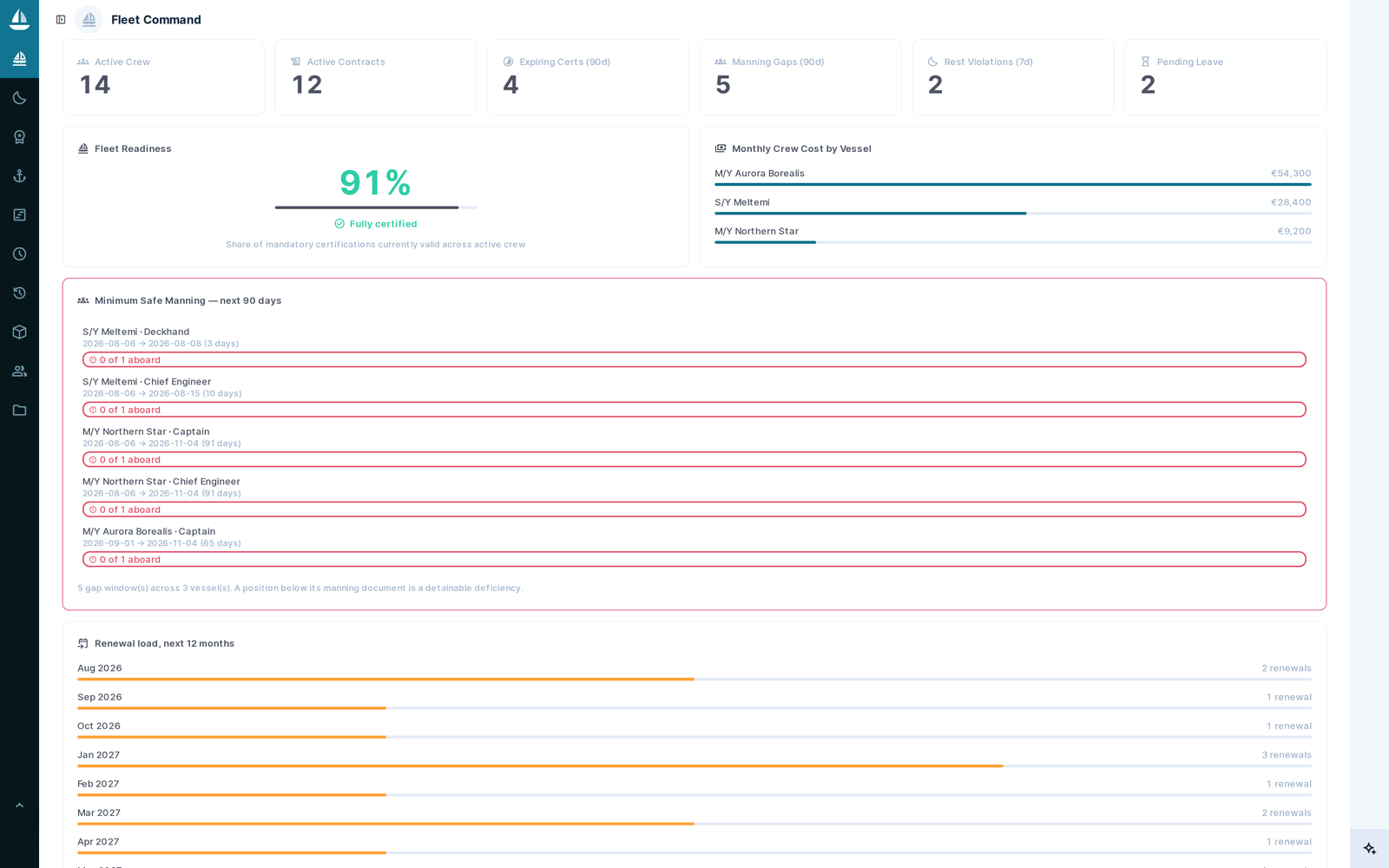
Meridian Fleet Command dashboard: readiness gauge at 91%, crew cost by vessel, minimum safe manning gaps across the next 90 days, and the 12-month certificate renewal load
64
collections
1,637
fields
15
TypeScript extensions
5
languages

Where the crew and certificate spreadsheets break

Crew certification lives in one workbook, rest hours in another, certificates in a shared drive, and the evidence pack gets rebuilt by hand before every inspection.

None of it tells you that a liferaft service certificate expires inside the next charter, that a position drops below the minimum safe manning document in eleven days, or that a rest pattern breached MLC A2.3 last Tuesday.

Meridian encodes those rules instead of describing them.

MLC rest hours, safe manning and certificates — encoded, not described

This is the part a marine buyer checks first, so here it is in specifics rather than adjectives.

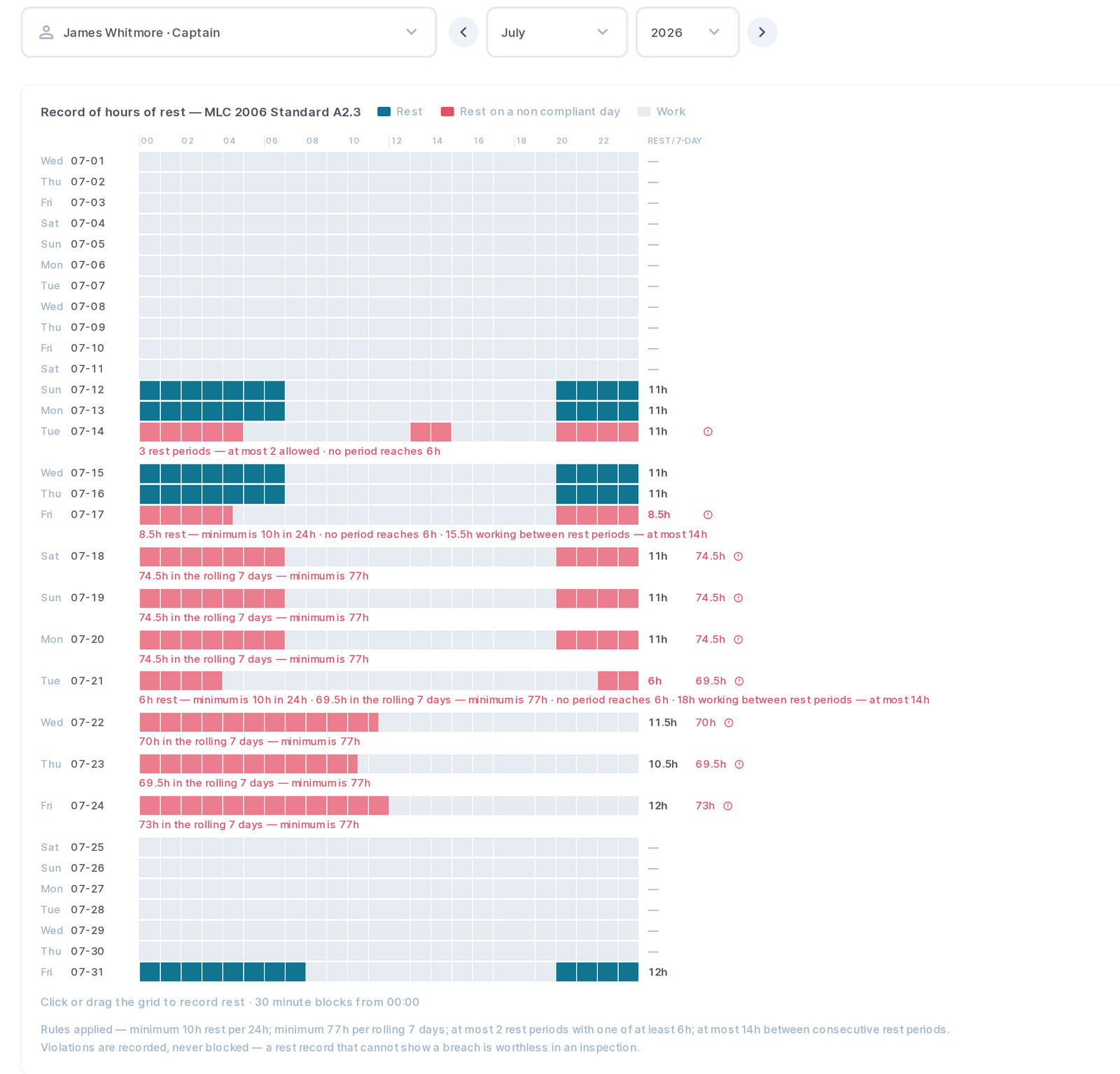
MLC 2006 hours of rest

Forty-eight half-hour blocks per day, click or drag to record. All four convention rules analysed live: minimum 10 hours in any 24, minimum 77 in any rolling seven days, at most two rest periods with one of at least six hours, and no more than 14 hours between them. Violations are recorded, never blocked — a rest record that cannot show a breach is worthless in an inspection.

The MLC hours-of-rest log: a half-hour grid for each crew member with the four convention rules evaluated live

Minimum safe manning

Every requirement checked day by day across a 90-day horizon against who is actually aboard, because a position below its manning document is a detainable deficiency. The forecast reports the window, the shortfall and the vessel.

Statutory certificates

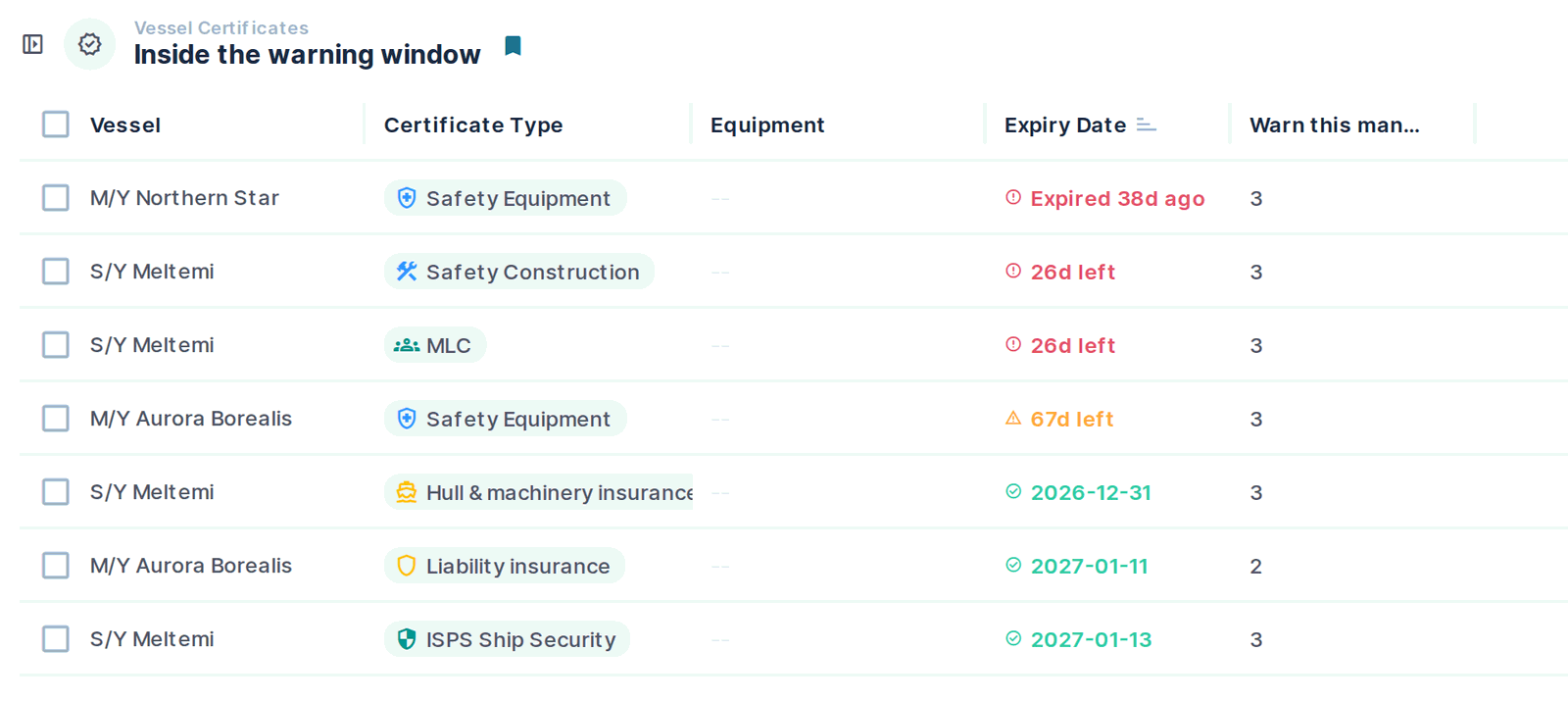
29 certificate types — flag, class, MLC, ISM, ISPS, load line — plus the equipment certificates that actually detain a yacht: liferaft service, EPIRB battery, CO₂ and fire systems, extinguishers, AIS, radar, GMDSS batteries, medical chest. Each carries its own warning window.

Vessel certificate register with expiry badges showing days remaining per certificate type

Drills and incidents

Drill types carry their statutory interval and SOLAS/ISM/ISPS reference, so the schedule is derived rather than typed. Attendance is acknowledged by the crew member, not ticked on their behalf. Incidents carry 16 categories, GPS, witness statements, and corrective actions as owned rows with due dates that cannot be self-verified.

Twelve modules: crew, compliance, engineering, supply and charter

One database, and a screen that matches what each role actually does with it.

Fleet

Vessels, cabins with signed-off inspections, and 29 certificate types each with its own warning window.

Crew

People, positions, contracts and the full dossier — passports, visas, vaccinations, next of kin, appraisals, sea service, skills matrix.

Scheduling

Rotations, leave approvals and a duty catalogue, with workload rebalancing that respects MLC rest limits.

Training

Courses, certificates and training records against the certification matrix.

Compliance

Certification matrix, inspections, MLC rest records and minimum safe manning.

Engineering

Equipment register with running hours, manuals and photos; work orders carrying labour, parts and the invoice.

Safety

Drills on statutory intervals, incidents with witnesses and media, corrective actions owned and dated.

Supply

Consumables, bulk fuel and water against tank capacity, and assets with insured value and provenance.

Finance

Budgets, multi-currency expenses and receipts, with derived balances owned by one trigger each.

Charter & Guests

Trips, the APA ledger, and a guest CRM with allergies, preferences and a pre-arrival brief.

HR Integration

Connected HR systems and an inbound sync audit.

Bridge

The captain's own vessel: who is aboard, today's watches, manning status, rest violations, leave to approve.

See all 64 collections

Table names as they exist in the database, grouped by module. Field definitions are not published.

Fleet

  • cabin_checklist_items
  • cabin_inspections
  • cabins
  • ports
  • vessel_certificates
  • vessel_positions
  • vessels

Crew

  • contracts
  • crew_applications
  • crew_members
  • positions

Crew dossier

  • crew_agreements
  • crew_clearances
  • crew_passports
  • crew_reviews
  • crew_screenings
  • crew_sea_service
  • crew_visas

Scheduling

  • leave_requests
  • rotations
  • shift_types
  • shifts

Training

  • certificates
  • courses
  • sop_runs
  • sops
  • training_records

Compliance

  • authorities
  • compliance_checks
  • compliance_requirements
  • documents
  • hours_of_rest
  • manning_requirements
  • visitors
  • visits

Engineering

  • equipment
  • maintenance_tasks
  • manufacturers
  • work_orders

Safety

  • drill_attendance
  • drill_types
  • drills
  • incidents

Supply

  • goods_receipts
  • inventory_items
  • purchase_orders
  • purchase_request_lines
  • purchase_requests
  • stock_movements
  • supplier_invoices
  • supplier_quotes
  • suppliers

Finance

  • budgets
  • bunkering
  • expenses
  • petty_cash_accounts
  • vendor_payments

Charter & guests

  • charter_guests
  • charters
  • guest_favourites
  • guest_household
  • guests

HR integration

  • hr_sync_logs
  • hr_systems

Eleven roles, and a permission boundary that is computed rather than promised

Anyone can add a role. The difficulty is a permission model that still holds when a captain, an owner and a deckhand all use the same database.

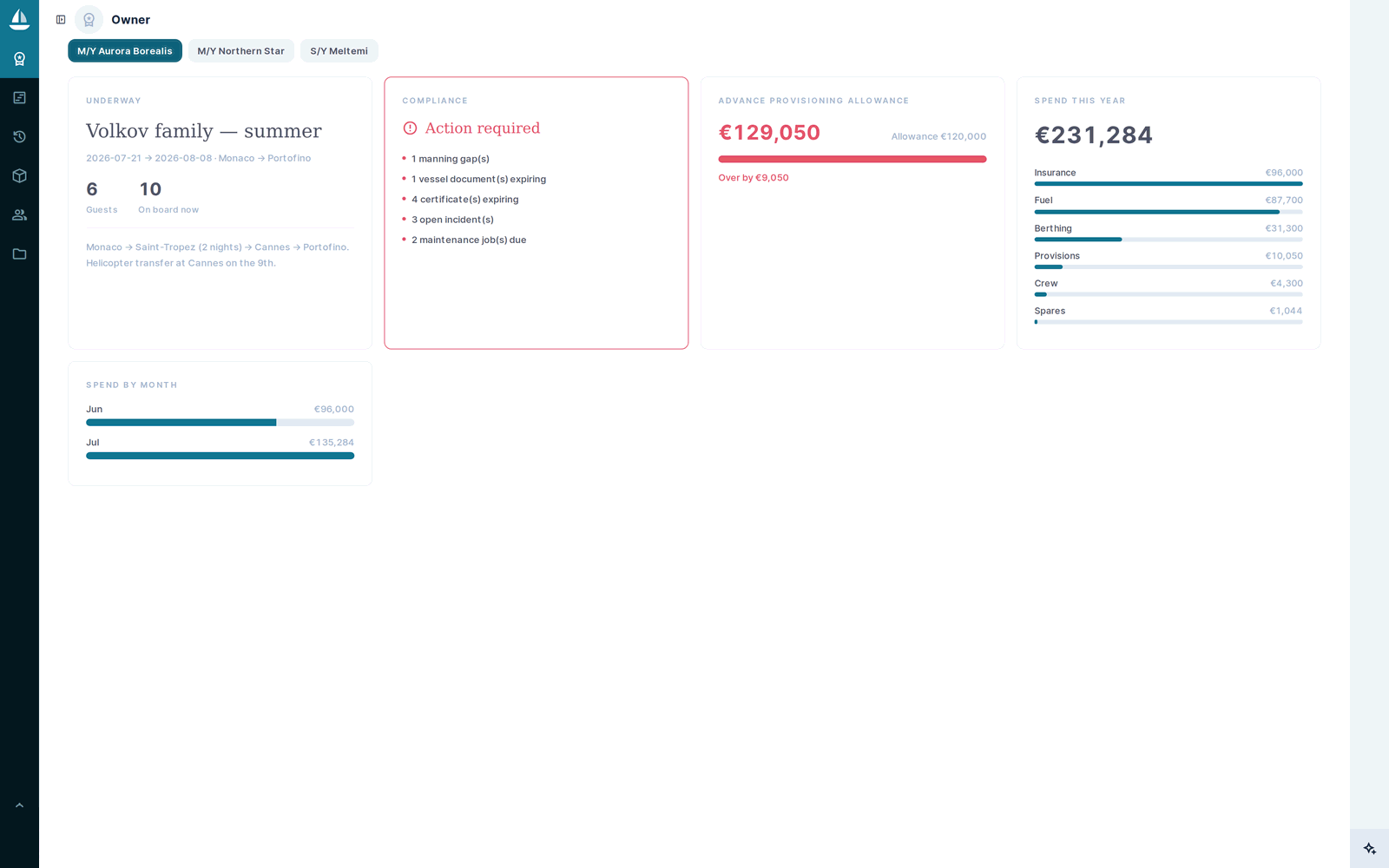
Owner Mode showing trip, compliance verdict, APA balance and spend by category — with no access to individual crew records

Crew log in, and see only themselves

Crew get a real login — and 36 of their 58 permissions carry a row-level filter tied to the signed-in user, so a crew member reading the crew table sees exactly one row: their own. Their contracts, certificates, passports, visas, appraisals and sea service resolve through that same filter. What they can write is narrow and theirs to file: rest hours, leave requests, expenses, next of kin, drill attendance, incident reports. Everything else is read-only or absent, and the filter is applied by the API, not by the screen.

The owner boundary is computed

Owner Mode still reports “10 aboard” and “1 manning gap” while holding no read permission on the crew table. The counts are computed server-side and returned as integers, gated on the caller's own access to the vessel.

Files are scoped by folder

Item access does not imply file access. Read is granted per folder, because the same table holds crew portraits, passport scans, medical certificates and expense receipts — and blanket access would hand every crew member the captain's passport.

Eleven roles, each with its own policy

Every role carries its own permission policy. These are the roles as they ship; add or reshape them like any other Directus role.

Administrator
Full access. The person who installs and configures it.
Owner
Vessel owner or family office. Trip, compliance verdict, APA balance and spend — no crew records.
Fleet Manager
Shore-side fleet management across every vessel.
Crew Manager
Shore-side HR: the dossier, contracts, certification and hiring.
Accounts
Shore-side finance. Budgets, invoices, payments and expense approval.
Captain
Vessel command, scoped to their own vessel.
Chief Officer
Safety, ISM and deck operations. Runs drills and owns the rest log.
Chief Engineer
The engine room: equipment, maintenance, bunkering and spares.
Chief Stewardess
Interior, guest experience and the petty cash float.
Head Chef
Galley, provisioning and guest dietary requirements.
Crew Member
Self service: their own dossier, and the things they file themselves.
Crew rotation and watch scheduling, with the gaps drawn underneath

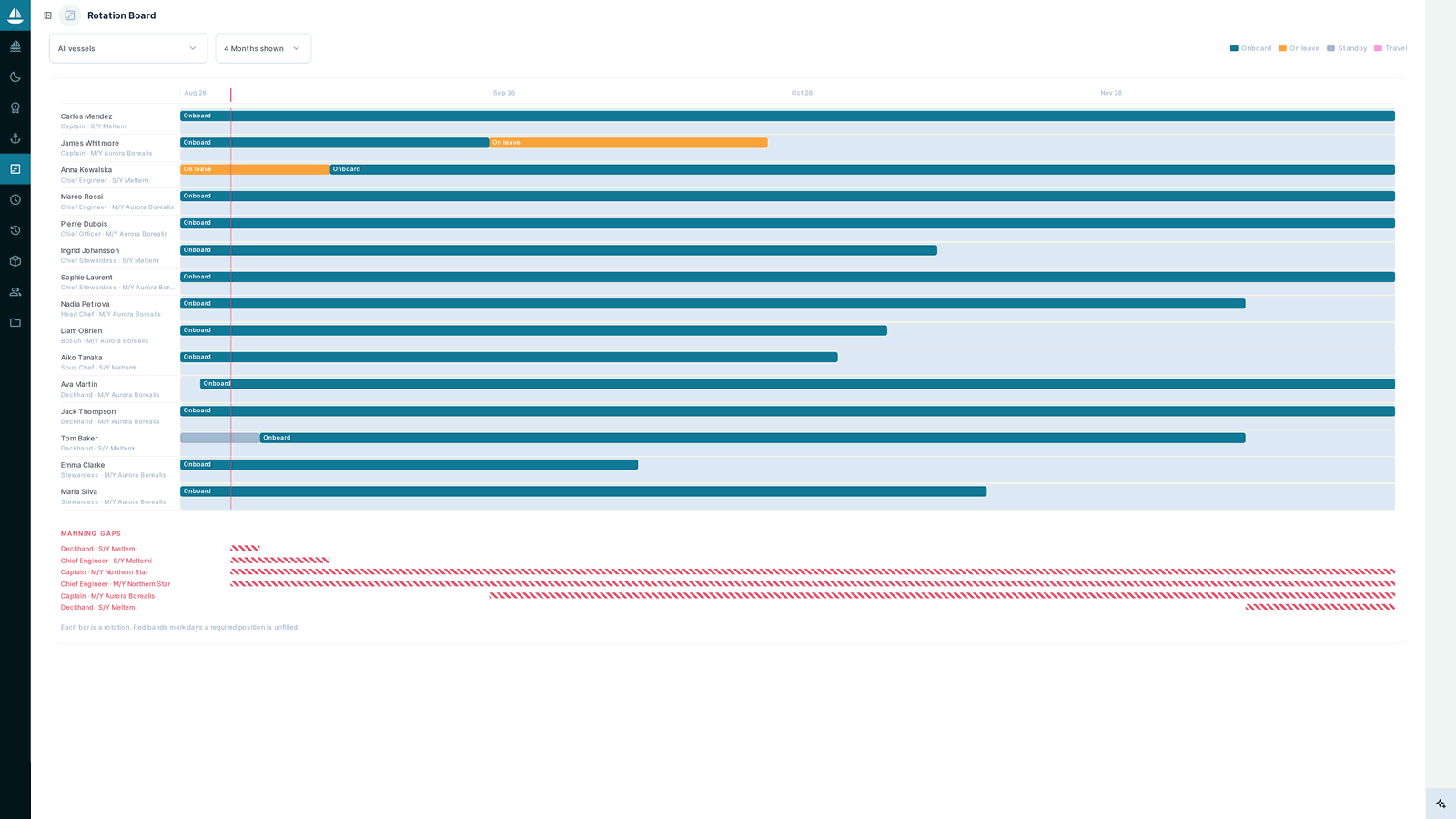
A Gantt timeline of rotations with manning-gap bands beneath it, and duty coverage per day against the vessel's operational state. Workload rebalancing proposes a roster, shows who ends up with how many hours and why each gap could not be filled — and writes nothing until you apply it.

Rotation board: a Gantt timeline of crew rotations with manning-gap bands drawn underneath

Fifteen custom Directus extensions, all TypeScript

This is the part no schema export reproduces. Every one is built with the official Directus extensions SDK, typechecks clean under strict mode, renders with Directus’s own components so it inherits your theming, and is gated per role.

  • fleet-commandModule

    Executive dashboard: readiness gauge, live KPIs, payroll by vessel, manning and certification gaps, expiring documents, 12-month renewal load.

  • bridgeModule

    The captain’s workspace for their own vessel — who is aboard, today’s watches, manning status, rest violations, leave to approve.

  • rest-logModule

    The MLC 2006 hours-of-rest record: 48 half-hour blocks a day, click or drag to edit, all four convention rules analysed live.

  • owner-modeModule

    The owner’s page: current trip and itinerary, compliance verdict, APA balance, spend by category and by month — with no access to crew records.

  • rotation-boardModule

    Gantt timeline of crew rotations with manning-gap bands drawn underneath.

  • watch-boardModule

    Duty coverage per day against the vessel’s state, plus workload rebalancing that proposes a roster and writes nothing until you apply it.

  • timelineModule

    The vessel’s year on one axis: charters, yard periods, certificate windows and crew rotations together.

  • compliance-checklistInterface

    Live certification checklist inside the crew editor — valid, expiring, expired or missing per required course, with a readiness bar.

  • document-buttonInterface

    Generates and downloads the document for that record: the seafarer employment agreement, the guest pre-arrival preference sheet.

  • iso-selectInterface

    Searchable ISO 3166 country and ISO 639 language picker. Stores the code, so 257 countries cost zero translation rows.

  • expiry-badgeDisplay

    Date fields rendered as urgency badges in lists and detail views: “Expired 12d ago”, “23d left”, “Never expires”.

  • iso-nameDisplay

    Renders a stored ISO code as its name in the reader’s own language.

  • crew-apiEndpoint

    The scoped API behind the crew portal and the generated documents, permission-checked on every call.

  • crew-guardHook

    Where the business rules live — the invariants enforced server-side rather than left to the interface.

  • readiness-gaugePanel

    Fleet readiness as an Insights panel. Shipped but unreachable by design, since Insights is deliberately switched off — the same figure sits in fleet-command.

Want to see it running?

Fifteen minutes on a call and we will walk the architecture, open the screens you care about, and answer the awkward questions.

Validation in two layers, because one is only a suggestion

In the app

Field validation with a translated message, so the person typing finds out immediately and in their own language.

In the database

CHECK constraints for cross-field invariants, GiST EXCLUDE constraints for overlap — the only race-safe way to prevent a double-booked cabin or an overlapping rotation — and PL/pgSQL triggers for status machines and finalise locks.

One owner per number

Every derived value — a budget's remaining, an inspection's pass and fail counts, a petty cash balance — is owned by exactly one trigger and is read-only in the app, so it cannot drift.

Five languages: English, Spanish, French, Italian and German

1,862 translation keys across English, Spanish, French, Italian and German — 9,310 rows. Not just collection names: field labels, dropdown values, help text, saved views and the custom module interfaces. Each person picks their language in their own profile.

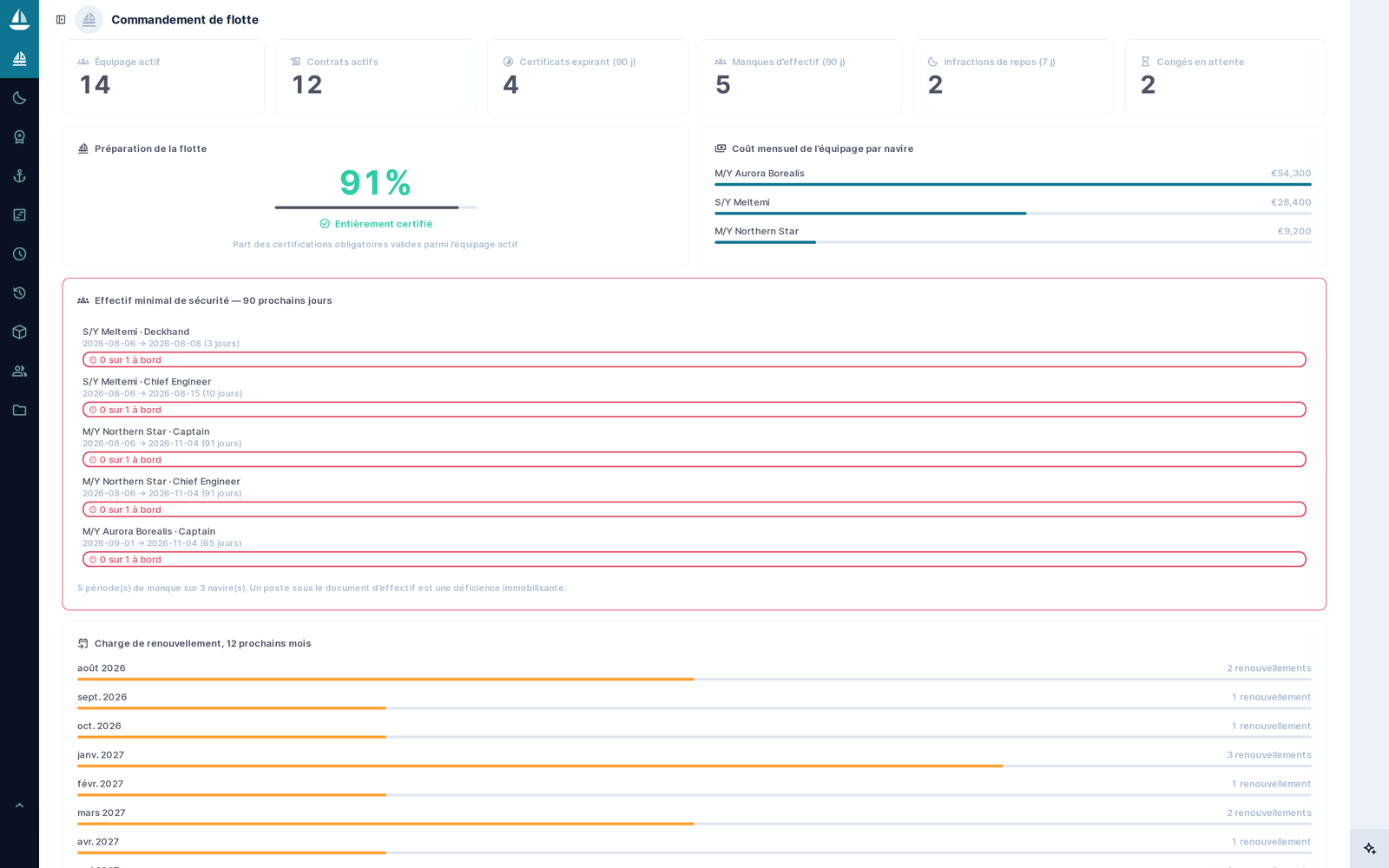
The same fleet screens rendered in French, including custom module interfaces and field labels

White-label: your branding, your product name

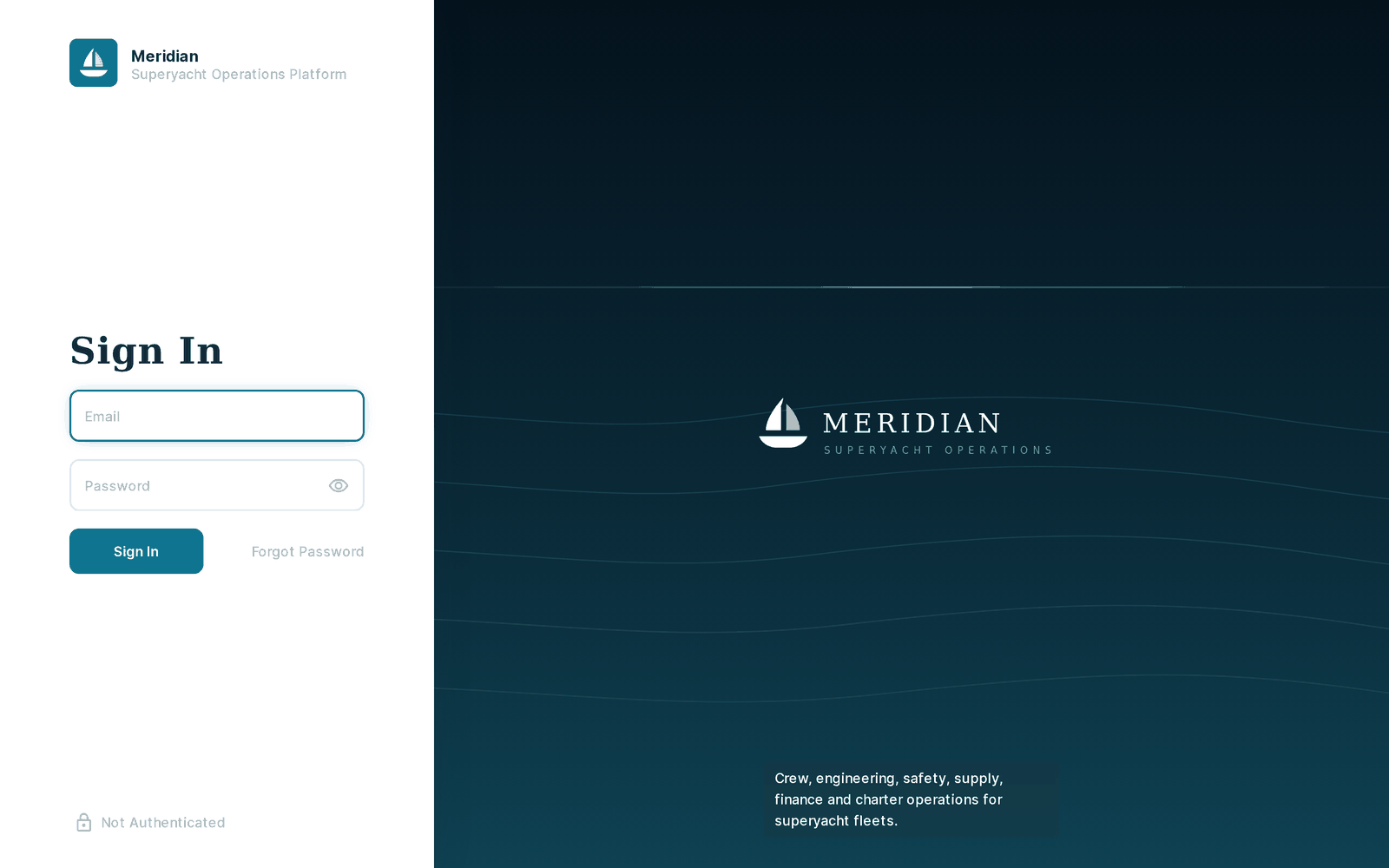
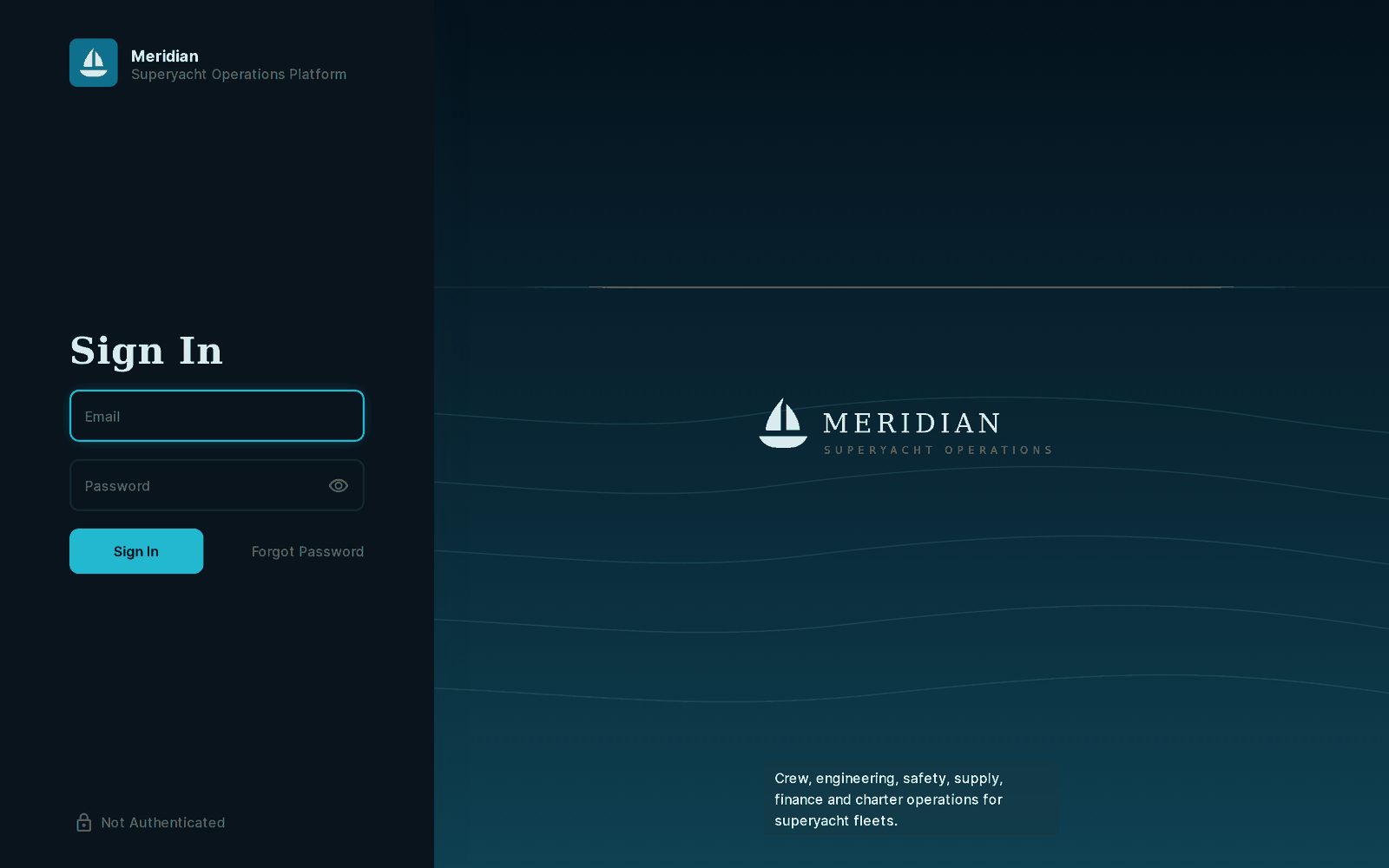
Meridian carries our branding out of the box — logo, login screen, favicon, light and dark themes — and all of it is meant to be replaced. The screens below are the same build in its two themes: project name, descriptor, mark, accent colour and the note beneath it all come from settings, so swapping them for your own is configuration rather than a fork. Rename the product, drop our mark, and run it as your system. Nothing phones home, and no screen carries our name unless you leave it there.

The Meridian login screen in the light theme — branded mark, project name, descriptor and note, all set from project settings
The same login screen in the dark theme, with the accent colour and panels re-themed

Self-hosted, and yours to run permanently

  • Full source, no phone-home, no runtime dependency on us, no per-seat fee.
  • Run it across your whole organisation — no limit on vessels, users, installs or environments.
  • Modify anything: change the schema, rewrite the extensions, rename it, remove the branding.
  • A perpetual licence that cannot be revoked or repriced, including after any support window ends.

The one boundary is simple: the software stays inside your organisation. You are buying an unrestricted right to use and change Meridian, not to pass it on. If you are a studio wanting to stand it up for a client, that is a separate arrangement — talk to us and we will license the deployment directly.

What Meridian does not do

You would find all of this in the first hour, so here it is in the first ten minutes. Where something is missing, it is missing because it depends on your credentials or your licences — not because it cannot be built.

  • No third-party integrations are included — no AIS feed, no flag-state portal, no accounting or payroll connector. Those depend on credentials and licences held by you, not by us. Position reports are already recorded through the API, so wiring a tracker or an accounting system to it is ordinary integration work: tell us what you need connected and we will quote it as a separate engagement.
  • No native mobile app. Crew use a mobile web portal against the same scoped API.
  • Not a hosted service. You run it. There is no account with us, and nothing calls home.
  • Not certified by anyone. It encodes MLC, SOLAS, ISM and ISPS requirements faithfully to the best of our understanding; it is not an approved or audited compliance product, and your DPA or flag state has the final word.
  • Directus itself ships under the Business Source License. That is free for most commercial use but has thresholds — we would rather raise that now than have you discover it later.

What installation and handover involve

  • The repository at a tagged version: schema snapshot, build scripts, all 15 extensions with source, seed data, branding assets and documentation.
  • A clean install on your infrastructure, or a walkthrough of you doing it. One Compose command plus the build scripts.
  • Fresh secrets. Every development credential is rotated at handover; yours are generated on your side and we never see them.
  • A decision about the demo fleet — keep it for training, or run the teardown and start on your real vessels.
  • A written walkthrough of the architecture: where the rules live, which script builds what, and how to add a module in the same style.

The questions we actually get

What is superyacht fleet management software?

It is the system a yacht management company uses to run a fleet: crew and their certification, MLC 2006 rest hours, statutory and equipment certificates, minimum safe manning, rotations and watches, engineering and work orders, supply, finance and charter. Meridian covers all of that in one database rather than across spreadsheets and a shared drive.

Does Meridian track MLC 2006 hours of rest?

Yes. Rest is recorded in forty-eight half-hour blocks per day and all four convention rules are analysed live: minimum 10 hours in any 24, minimum 77 in any rolling seven days, at most two rest periods with one of at least six hours, and no more than 14 hours between them. Violations are recorded rather than blocked, because a rest record that cannot show a breach is worthless in an inspection.

Can it track vessel certificate expiry and minimum safe manning?

Yes. Twenty-nine certificate types are tracked — flag, class, MLC, ISM, ISPS and load line, plus the equipment certificates that actually detain a yacht, such as liferaft service, EPIRB battery, CO₂ and fire systems and the medical chest — each with its own warning window. Minimum safe manning is checked day by day across a 90-day horizon against who is actually aboard, and reports the window, the shortfall and the vessel.

Is it hosted, or do we run it ourselves?

You run it. Meridian ships as Docker Compose for all four services and you hold the full source, so there is no account with us and nothing calls home. That also means the data never leaves your infrastructure.

Can an owner see the dashboard without seeing crew records?

Yes, and that boundary is computed rather than promised. Owner Mode reports figures such as how many crew are aboard and how many manning gaps exist while holding no read permission on the crew table — the counts are calculated server-side and returned as integers, gated on the caller's own access to the vessel.

What does it cost?

It is a one-time perpetual licence rather than a subscription, priced against what building the equivalent would cost you. The figure depends on whether you are deploying it for your own fleet or standing it up for a client, so get in touch and we will give you the number for your case.

What happens if you stop supporting it?

It keeps running. Meridian is built on the official Directus image and stock Postgres, and you hold all the source, so nothing depends on us being here. The licence is perpetual and cannot be revoked.

Can we modify it?

Anything. Change the schema, rewrite the extensions, rename it, remove the branding, and keep your modifications entirely private. The single restriction is that the software stays inside your organisation.

Is it available in languages other than English?

Yes — English, Spanish, French, Italian and German, across 1,862 translation keys. That covers field labels, dropdown values, help text and the custom module screens, not only collection names. Each person selects their language in their own profile.

Tell us about your fleet

We will walk the architecture, you ask the awkward questions, and you decide. If Meridian is not the right fit we will say so.